Whitelist the CoreDash Crawler on Your CDN
Your CDN is blocking our performance tester. Here is how to let it through.

Trusted by market leaders · Client results






















Whitelist the Core/Dash crawler
Sometimes our crawlers will get blocked by your CDN's firewall. That is due to your CDN's security settings. Your website will display a captcha that our crawlers will not attempt to solve.
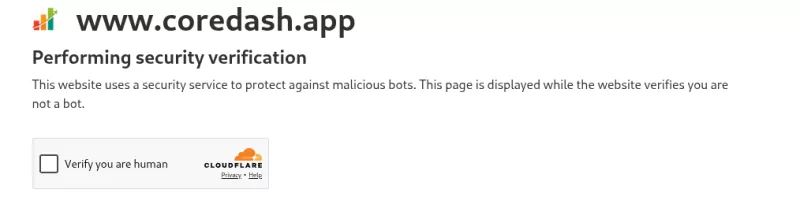
Unblock the Core/Dash crawler
Core/Dashg crawlers present themselvelves to your servers as Core/Dash performacne tester.:
CoreDash/1.0 (+https://www.corewebvitals.io/coredash-performance-tester)
It loads your page in a real browser and measures Largest Contentful Paint, Interaction to Next Paint and Cumulative Layout Shift. It needs a real browser because those metrics only exist once the page actually renders.
That is also why the most common reason why your CDN blocks us. Your infra team has set your WAF security to high and that will basically block all bots. You have to tell your CDN that we are the 'good kind of bot'
You add one rule that skips the bot check for CoreDash/1.0 and leaves everything else alone.
Allow by user agent, not by IP
Match the user agent, not an IP address. Our tests run from cloud infrastructure, so the source IP changes between runs. Allowlist an IP today and a test next week can arrive from a different one and get blocked again. The CoreDash/1.0 string does not change, so match on that.
Cloudflare
Cloudflare blocks our tests more than any other CDN. Which rule you need depends on your plan.
On a Pro plan or higher, add a WAF custom rule with the Skip action:
- Go to Security > Security rules and create a rule. On the new dashboard this lives under Security rules.
- Name it clearly, for example Allow Core/Dash.
- Click edit expression and change the expression to
http.user_agent contains "CoreDash/". - Set the action to Skip.
- In the Skip options, check Super Bot Fight Mode. Check All managed rules too if a managed rule is what blocked the test.
- Deploy the rule.

One catch on the Free plan. Bot Fight Mode there does not run through the WAF, so a Skip rule cannot touch it and there is no exception to make. If you are on Free and the test keeps getting challenged, turn Bot Fight Mode off under Security > Bots while you run the test, then switch it back on. A paid plan gives you Super Bot Fight Mode, which does respect Skip rules.
AWS WAF and CloudFront
CloudFront itself does not block the crawler. The block comes from the AWS WAF web ACL attached to your distribution. Add an Allow rule above your Bot Control group:
- Open the web ACL linked to your CloudFront distribution.
- Add a rule and choose Rule builder, then a custom rule.
- For the inspection, choose Single header and enter
User-Agent. - Set the match type to Contains string and the string to
CoreDash. - Set the action to Allow.
- Give the rule a lower priority number than your Bot Control rule group so it runs first.
Order matters here. Allow is a terminating action in AWS WAF. When your rule matches, WAF allows the request and stops evaluating, so Bot Control never sees it. Put the rule below Bot Control and the block has already happened before your Allow rule runs.
Still blocked?
If you add the rule, run another test, and it still fails, the block is coming from another layer: a second WAF, a security plugin, or a server rule in .htaccess or nginx. Look for the same CoreDash user agent there and allow it the same way. If you are stuck, contact us with the firewall you use and we will help you find the rule.

